앱스토어 없이도 "앱"을 배포할 수 있다면?
2023년 Statista 보고서에 따르면, 평균적인 스마트폰 사용자가 한 달에 새로 설치하는 앱은 0~2개에 불과합니다. 앱스토어에서 검색하고, 다운로드를 기다리고, 용량을 확인하는 과정이 상당한 진입 장벽으로 작용하는 것이죠. 반면 웹사이트는 URL 하나로 즉시 접근할 수 있지만, 오프라인 사용이나 푸시 알림 같은 네이티브 기능이 부족했습니다.
PWA(Progressive Web App)는 이 두 세계의 장점을 결합합니다. 웹의 접근성과 네이티브 앱의 경험을 동시에 제공하는 것이죠. Twitter(현 X), Starbucks, Pinterest 같은 대형 서비스가 PWA를 도입한 이후, 전환율과 사용자 참여도가 크게 향상되었다는 사례가 잘 알려져 있습니다.
---
PWA의 세 가지 필수 요소
PWA를 구성하는 핵심 기술은 세 가지입니다: Service Worker, Web App Manifest, HTTPS. 이 중 HTTPS는 보안을 위한 전제 조건이고, 나머지 두 기술이 PWA의 기능적 핵심을 담당합니다.
Web App Manifest
`manifest.json`은 앱의 메타데이터를 정의합니다. 브라우저가 이 파일을 인식하면 "홈 화면에 추가" 프롬프트를 표시할 수 있게 됩니다.
```json { "name": "AlwaysCorp 블로그", "short_name": "AlwaysCorp", "description": "기술, 건강, 라이프스타일 콘텐츠", "start_url": "/", "display": "standalone", "background_color": "#ffffff", "theme_color": "#2563eb", "orientation": "any", "icons": [ { "src": "/icons/icon-192x192.png", "sizes": "192x192", "type": "image/png", "purpose": "any maskable" }, { "src": "/icons/icon-512x512.png", "sizes": "512x512", "type": "image/png" } ], "screenshots": [ { "src": "/screenshots/home.png", "sizes": "1280x720", "type": "image/png", "form_factor": "wide" } ] } ```
`display` 속성은 앱의 외관을 결정하는데, `standalone`을 설정하면 브라우저 UI(주소창, 탭 바)가 숨겨져 네이티브 앱과 동일한 느낌을 줍니다. `fullscreen`은 게임이나 몰입형 콘텐츠에, `minimal-ui`는 뒤로 가기 버튼 정도만 남기는 옵션입니다.

---
Service Worker — PWA의 심장
Service Worker는 브라우저와 네트워크 사이에 위치하는 프록시 스크립트입니다. 네트워크 요청을 가로채서 캐시된 응답을 반환하거나, 오프라인 상태에서도 앱이 동작하도록 만들어 줍니다.
등록과 생명주기
```typescript // app/layout.tsx (Next.js) 또는 index.html if ('serviceWorker' in navigator) { window.addEventListener('load', async () => { try { const registration = await navigator.serviceWorker.register('/sw.js', { scope: '/', }); console.log('SW 등록 성공:', registration.scope); } catch (error) { console.error('SW 등록 실패:', error); } }); } ```
```javascript // public/sw.js const CACHE_NAME = 'app-cache-v1'; const STATIC_ASSETS = [ '/', '/offline.html', '/styles/main.css', '/scripts/app.js', '/icons/icon-192x192.png', ];
// Install — 정적 자산 사전 캐싱 self.addEventListener('install', (event) => { event.waitUntil( caches.open(CACHE_NAME).then((cache) => { return cache.addAll(STATIC_ASSETS); }) ); self.skipWaiting(); // 즉시 활성화 });
// Activate — 이전 버전 캐시 정리 self.addEventListener('activate', (event) => { event.waitUntil( caches.keys().then((keys) => { return Promise.all( keys .filter((key) => key !== CACHE_NAME) .map((key) => caches.delete(key)) ); }) ); self.clients.claim(); // 모든 탭에 즉시 적용 }); ```
캐싱 전략
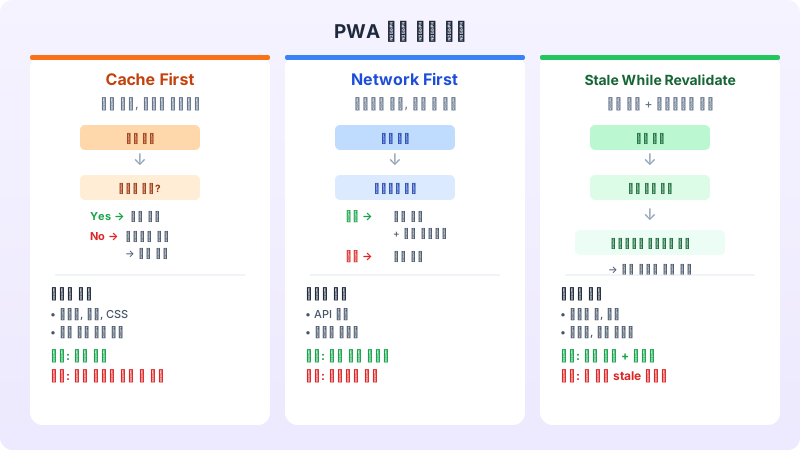
네트워크 요청을 어떻게 처리할지 결정하는 것이 Service Worker의 핵심입니다. 상황에 따라 다른 전략을 적용해야 하죠.
```javascript // 1. Cache First — 정적 자산 (이미지, 폰트, CSS) self.addEventListener('fetch', (event) => { if (event.request.destination === 'image') { event.respondWith( caches.match(event.request).then((cached) => { return cached || fetch(event.request).then((response) => { const clone = response.clone(); caches.open(CACHE_NAME).then((cache) => cache.put(event.request, clone)); return response; }); }) ); } });
// 2. Network First — API 응답, 동적 콘텐츠 self.addEventListener('fetch', (event) => { if (event.request.url.includes('/api/')) { event.respondWith( fetch(event.request) .then((response) => { const clone = response.clone(); caches.open('api-cache').then((cache) => cache.put(event.request, clone)); return response; }) .catch(() => caches.match(event.request)) ); } });
// 3. Stale While Revalidate — 블로그 글, 뉴스 self.addEventListener('fetch', (event) => { event.respondWith( caches.match(event.request).then((cached) => { const fetchPromise = fetch(event.request).then((response) => { caches.open(CACHE_NAME).then((cache) => cache.put(event.request, response.clone())); return response; }); return cached || fetchPromise; }) ); }); ```
Cache First는 속도가 최우선인 정적 자산에, Network First는 최신 데이터가 중요한 API에, Stale While Revalidate는 빠른 응답과 최신 데이터 둘 다 필요한 콘텐츠에 적합합니다.
---
오프라인 경험 설계
오프라인 지원은 단순히 "네트워크 에러 대신 캐시된 페이지를 보여주는 것"이 아닙니다. 의도적인 오프라인 경험을 설계해야 합니다.
```html <!-- public/offline.html --> <!DOCTYPE html> <html lang="ko"> <head> <meta charset="UTF-8"> <meta name="viewport" content="width=device-width, initial-scale=1.0"> <title>오프라인 | AlwaysCorp</title> <style> body { display: flex; align-items: center; justify-content: center; min-height: 100vh; font-family: system-ui; } .container { text-align: center; max-width: 400px; padding: 2rem; } .icon { font-size: 4rem; margin-bottom: 1rem; } h1 { font-size: 1.5rem; margin-bottom: 0.5rem; } p { color: #6b7280; line-height: 1.6; } button { margin-top: 1rem; padding: 0.75rem 1.5rem; background: #2563eb; color: white; border: none; border-radius: 8px; cursor: pointer; } </style> </head> <body> <div class="container"> <div class="icon">📡</div> <h1>인터넷 연결이 필요합니다</h1> <p>이 페이지는 아직 캐시되지 않았어요. 네트워크에 연결한 후 다시 시도해주세요.</p> <button onclick="location.reload()">다시 시도</button> </div> </body> </html> ```
---
푸시 알림
웹 푸시 알림은 사용자 재방문을 유도하는 강력한 도구입니다. Service Worker가 백그라운드에서 동작하므로, 브라우저가 닫혀 있어도 알림을 받을 수 있습니다.
```typescript // 알림 권한 요청 async function requestNotificationPermission() { const permission = await Notification.requestPermission(); if (permission === 'granted') { const registration = await navigator.serviceWorker.ready; const subscription = await registration.pushManager.subscribe({ userVisibleOnly: true, applicationServerKey: urlBase64ToUint8Array(VAPID_PUBLIC_KEY), }); // 서버에 구독 정보 전송 await fetch('/api/push/subscribe', { method: 'POST', headers: { 'Content-Type': 'application/json' }, body: JSON.stringify(subscription), }); } } ```
```javascript // sw.js — 푸시 이벤트 처리 self.addEventListener('push', (event) => { const data = event.data?.json() ?? {}; const options = { body: data.body || '새로운 소식이 있습니다.', icon: '/icons/icon-192x192.png', badge: '/icons/badge-72x72.png', data: { url: data.url || '/' }, actions: [ { action: 'open', title: '열기' }, { action: 'dismiss', title: '닫기' }, ], }; event.waitUntil(self.registration.showNotification(data.title || '알림', options)); });
self.addEventListener('notificationclick', (event) => { event.notification.close(); if (event.action === 'open' || !event.action) { event.waitUntil(clients.openWindow(event.notification.data.url)); } }); ```
---
Next.js에서 PWA 구현하기
Next.js 프로젝트에서는 `next-pwa` 패키지를 활용하면 Service Worker를 자동으로 생성할 수 있습니다.
```typescript // next.config.ts import withPWA from 'next-pwa';
const config = withPWA({ dest: 'public', register: true, skipWaiting: true, disable: process.env.NODE_ENV === 'development', runtimeCaching: [ { urlPattern: /^https:\/\/fonts\.googleapis\.com\/./i, handler: 'CacheFirst', options: { cacheName: 'google-fonts-cache', expiration: { maxEntries: 10, maxAgeSeconds: 365 24 60 60 }, }, }, { urlPattern: /\.(?:png|jpg|jpeg|svg|gif|webp|avif)$/i, handler: 'CacheFirst', options: { cacheName: 'image-cache', expiration: { maxEntries: 100, maxAgeSeconds: 30 24 60 * 60 }, }, }, ], });
export default config; ```
---
PWA 성능 측정과 Lighthouse 점수
Google Lighthouse의 PWA 감사는 다음 항목을 체크합니다: HTTPS 사용 여부, Service Worker 등록, Manifest 파일 존재, 오프라인 페이지, 앱 설치 가능성 등. 이 모든 항목을 만족하면 Lighthouse PWA 배지를 획득할 수 있습니다.
PWA를 프로덕션에 배포하기 전에 반드시 확인해야 할 사항이 있습니다. 먼저 Service Worker 업데이트 전략을 명확히 정해야 합니다. 사용자가 오래된 캐시 버전을 계속 보는 상황을 방지하기 위해, `skipWaiting`과 `clientsClaim`을 적절히 활용하세요. 또한 캐시 용량 제한(`maxEntries`, `maxAgeSeconds`)을 설정하여 사용자의 저장 공간을 과도하게 사용하지 않도록 주의해야 합니다.
PWA는 "네이티브 앱을 대체하는 것"이 아니라 "웹의 강점에 네이티브 기능을 더하는 것"입니다. 모든 프로젝트에 PWA가 필요한 것은 아니지만, 콘텐츠 중심 웹사이트, 반복 방문이 중요한 서비스, 오프라인 접근이 필요한 도구 등에서는 PWA가 훌륭한 선택이 될 수 있습니다.