4년 만의 메이저 업데이트, 무엇이 달라졌나
2024년 12월 공식 릴리스된 React 19는 2022년 React 18 이후 약 2년 만의 메이저 업데이트입니다. "점진적 개선"이 아닌 패러다임 전환에 가까운 변화가 포함되어 있어, React 생태계 전반에 상당한 영향을 미치고 있죠. Stack Overflow 2024 Developer Survey에 따르면 React는 여전히 프론트엔드 프레임워크 사용률 1위(40.58%)를 차지하고 있기 때문에, 이번 업데이트의 파급력은 결코 작지 않습니다.
아래에서는 React 19의 핵심 기능을 하나씩 짚어보고, 실제 프로젝트에 적용할 수 있는 구체적인 코드를 함께 다룹니다.
---
use 훅 — Promise와 Context를 직접 읽는 새로운 방식
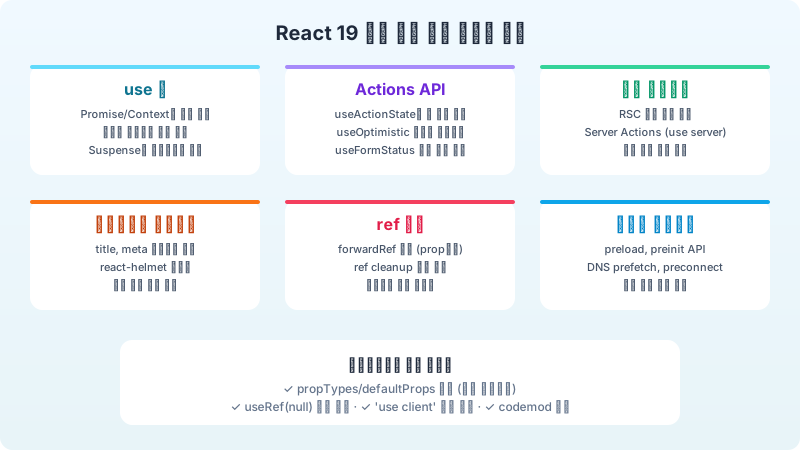
React 19에서 가장 주목받는 기능 중 하나가 바로 `use` 훅입니다. 기존의 `useEffect` + `useState` 조합으로 비동기 데이터를 불러오던 패턴이, `use` 하나로 극적으로 단순해졌습니다.
기존 방식의 문제
```typescript // 기존: useEffect + useState + 로딩 상태 + 에러 상태 function UserProfile({ userId }: { userId: string }) { const [user, setUser] = useState<User | null>(null); const [loading, setLoading] = useState(true); const [error, setError] = useState<Error | null>(null);
useEffect(() => { setLoading(true); fetchUser(userId) .then(setUser) .catch(setError) .finally(() => setLoading(false)); }, [userId]);
if (loading) return <Spinner />; if (error) return <ErrorMessage error={error} />; return <div>{user?.name}</div>; } ```
이 패턴은 보일러플레이트가 많고, 워터폴(waterfall) 문제를 유발하기 쉽습니다. 컴포넌트가 마운트된 후에야 데이터 요청이 시작되니까요.
use 훅으로 개선
```typescript // React 19: use 훅 import { use, Suspense } from 'react';
function UserProfile({ userPromise }: { userPromise: Promise<User> }) { const user = use(userPromise); return <div>{user.name}</div>; }
// 부모 컴포넌트 function App() { const userPromise = fetchUser('123'); // 렌더 전에 요청 시작 return ( <Suspense fallback={<Spinner />}> <UserProfile userPromise={userPromise} /> </Suspense> ); } ```
`use`는 다른 훅과 달리 조건문이나 반복문 안에서도 호출할 수 있다는 점이 특별합니다. 이것은 React 훅의 "규칙(Rules of Hooks)"에서 유일한 예외인데, `use`가 컴포넌트 상태를 관리하는 것이 아니라 외부 값을 "읽는" 역할만 수행하기 때문입니다.
```typescript function StatusMessage({ isLoggedIn }: { isLoggedIn: boolean }) { if (isLoggedIn) { const user = use(userContext); // 조건부 호출 가능! return <p>환영합니다, {user.name}님</p>; } return <p>로그인해주세요</p>; } ```
---
Actions — 폼과 비동기 상태 관리의 혁신
React 19에서는 폼 제출과 비동기 뮤테이션을 처리하는 Actions 패턴이 공식적으로 도입되었습니다. `useActionState`, `useFormStatus`, 그리고 `useOptimistic` 세 가지 훅이 핵심이죠.
useActionState
서버 액션이나 비동기 함수의 상태를 추적하는 훅으로, 기존의 `useState` + 로딩/에러 관리를 대체합니다.
```typescript import { useActionState } from 'react';
async function updateProfile(prevState: FormState, formData: FormData) { const name = formData.get('name') as string; const result = await api.updateUser({ name });
if (!result.success) { return { error: '프로필 업데이트에 실패했어요.' }; } return { success: true, message: '저장되었습니다!' }; }
function ProfileForm() { const [state, action, isPending] = useActionState(updateProfile, {});
return ( <form action={action}> <input name="name" disabled={isPending} /> <button type="submit" disabled={isPending}> {isPending ? '저장 중...' : '저장'} </button> {state.error && <p className="text-red-500">{state.error}</p>} {state.success && <p className="text-green-500">{state.message}</p>} </form> ); } ```
useOptimistic
네트워크 응답을 기다리지 않고 UI를 즉시 업데이트하는 낙관적 업데이트(Optimistic Update)를 선언적으로 처리할 수 있게 되었습니다. 이 방식은 사용자 경험을 극적으로 향상시키는데, 특히 좋아요 버튼이나 북마크 같은 빈번한 인터랙션에서 효과적입니다.
```typescript import { useOptimistic } from 'react';
function LikeButton({ initialCount }: { initialCount: number }) { const [optimisticCount, setOptimisticCount] = useOptimistic( initialCount, (current, increment: number) => current + increment );
async function handleLike() { setOptimisticCount(1); // UI 즉시 반영 await api.likePost(); // 서버 요청은 백그라운드에서 }
return <button onClick={handleLike}>♥ {optimisticCount}</button>; } ```
---
서버 컴포넌트 — 공식 지원의 시작
React 18에서 실험적이었던 서버 컴포넌트(React Server Components, RSC)가 React 19에서 안정 버전으로 전환되었습니다. 서버 컴포넌트의 핵심 아이디어는 간단합니다: 서버에서만 실행되는 컴포넌트를 통해 클라이언트 번들 크기를 줄이고, 데이터 접근을 단순화하는 것.
Server Component vs Client Component
```typescript // 서버 컴포넌트 (기본값) — 번들에 포함되지 않음 async function ArticleList() { const articles = await db.article.findMany({ orderBy: { publishedAt: 'desc' }, take: 10, });
return ( <ul> {articles.map(article => ( <li key={article.id}> <h3>{article.title}</h3> <LikeButton count={article.likes} /> {/ 클라이언트 컴포넌트 /} </li> ))} </ul> ); } ```
```typescript // 클라이언트 컴포넌트 — 'use client' 지시어 필요 'use client';
import { useState } from 'react';
function LikeButton({ count }: { count: number }) { const [likes, setLikes] = useState(count); return <button onClick={() => setLikes(l => l + 1)}>♥ {likes}</button>; } ```
서버 컴포넌트에서는 `useState`, `useEffect` 같은 클라이언트 훅을 사용할 수 없습니다. 반대로 데이터베이스 쿼리, 파일 시스템 접근 등 서버 전용 API는 서버 컴포넌트에서만 호출해야 합니다. 이런 명확한 분리가 처음엔 불편할 수 있지만, 익숙해지면 컴포넌트의 역할이 분명해져 아키텍처가 깔끔해지는 것을 경험하게 됩니다.
Server Actions — `'use server'`
서버 함수를 클라이언트 컴포넌트에서 직접 호출할 수 있습니다. RPC(Remote Procedure Call) 스타일이라고 볼 수 있는데, API 라우트를 별도로 만들 필요가 없어집니다.
```typescript // actions/user.ts 'use server';
export async function deleteAccount(userId: string) { await db.user.delete({ where: { id: userId } }); redirect('/goodbye'); } ```
---
문서 메타데이터 네이티브 지원
React 19 이전에는 `<title>`, `<meta>` 태그를 관리하기 위해 react-helmet이나 next/head 같은 서드파티 솔루션이 필요했습니다. 이제 React 자체가 메타데이터 호이스팅을 지원합니다.
```typescript function BlogPost({ post }: { post: Post }) { return ( <article> <title>{post.title} | 내 블로그</title> <meta name="description" content={post.excerpt} /> <meta property="og:title" content={post.title} /> <link rel="canonical" href={`https://example.com/blog/${post.slug}`} /> <h1>{post.title}</h1> <p>{post.content}</p> </article> ); } ```
컴포넌트 트리 어디서든 `<title>`이나 `<meta>`를 렌더링하면, React가 자동으로 `<head>`로 호이스팅합니다. 중복 태그도 자동으로 처리되어, 깊이 중첩된 컴포넌트에서도 안전하게 메타데이터를 선언할 수 있죠.
---
ref 개선과 forwardRef 제거
React 19에서는 함수 컴포넌트가 `ref`를 일반 prop으로 받을 수 있게 되었습니다. `forwardRef`로 감싸야 했던 불편함이 사라진 셈이죠.
```typescript // React 18 — forwardRef 필요 const Input = forwardRef<HTMLInputElement, InputProps>((props, ref) => { return <input ref={ref} {...props} />; });
// React 19 — ref를 직접 prop으로 function Input({ ref, ...props }: InputProps & { ref?: Ref<HTMLInputElement> }) { return <input ref={ref} {...props} />; } ```
또한 ref에 cleanup 함수를 반환할 수 있게 되어, DOM 노드가 언마운트될 때 정리 로직을 실행할 수 있습니다.
```typescript function VideoPlayer() { return ( <video ref={(el) => { if (el) { const observer = new IntersectionObserver(/ ... /); observer.observe(el); return () => observer.disconnect(); // cleanup! } }} /> ); } ```
---
그 외 주목할 변화들
리소스 프리로딩 API
```typescript import { preload, preinit, prefetchDNS, preconnect } from 'react-dom';
function App() { preinit('/styles/critical.css', { as: 'style' }); preload('/fonts/pretendard.woff2', { as: 'font', crossOrigin: 'anonymous' }); prefetchDNS('https://api.example.com'); preconnect('https://cdn.example.com'); // ... } ```
브라우저가 리소스를 더 일찍 발견하도록 힌트를 제공하여 초기 로딩 성능을 개선합니다. 특히 폰트 프리로딩은 LCP(Largest Contentful Paint) 개선에 직접적인 효과가 있습니다.
에러 처리 개선
React 19에서는 에러 보고 방식이 대폭 개선되었습니다. 렌더링 도중 발생한 에러와 이벤트 핸들러에서 발생한 에러가 더 이상 두 번 로깅되지 않으며, `onCaughtError`와 `onUncaughtError` 콜백을 통해 에러를 체계적으로 처리할 수 있습니다.
```typescript const root = createRoot(document.getElementById('root')!, { onCaughtError: (error, errorInfo) => { // Error Boundary가 잡은 에러 Sentry.captureException(error, { extra: errorInfo }); }, onUncaughtError: (error, errorInfo) => { // 잡히지 않은 에러 showCrashReport(error); }, }); ```
스타일시트 우선순위 관리
```typescript function Component() { return ( <> <link rel="stylesheet" href="/base.css" precedence="low" /> <link rel="stylesheet" href="/theme.css" precedence="medium" /> <link rel="stylesheet" href="/override.css" precedence="high" /> </> ); } ```
`precedence` 속성을 통해 스타일시트 로딩 순서를 제어할 수 있으며, React가 중복 스타일시트를 자동으로 제거해줍니다.
---
마이그레이션 시 주의사항
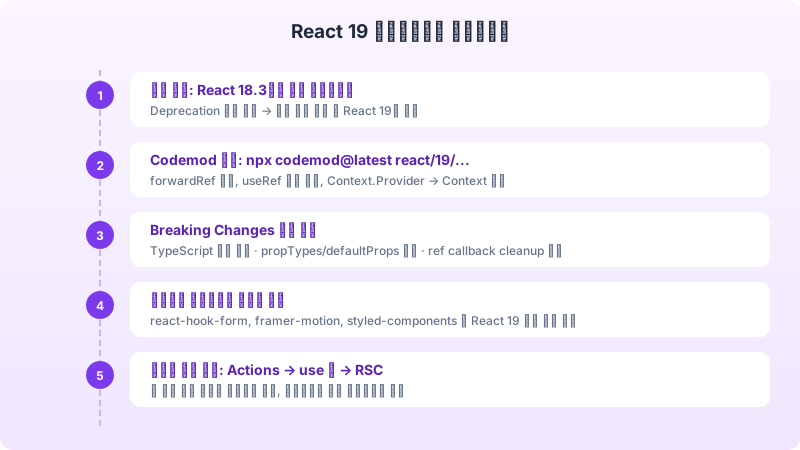
React 19로 업그레이드하기 전에 몇 가지 Breaking Change를 확인해야 합니다. 공식 문서에서 제공하는 codemods를 활용하면 자동 변환이 가능한 부분도 있지만, 수동 확인이 필요한 사항도 존재합니다.
첫째, `propTypes`와 `defaultProps`가 함수 컴포넌트에서 제거되었습니다. TypeScript를 사용하고 있다면 이미 영향이 없겠지만, JavaScript 프로젝트에서는 대체 방안을 마련해야 합니다. 둘째, `React.lazy`로 감싼 컴포넌트가 서버 컴포넌트 환경에서 다르게 동작할 수 있으므로, `'use client'` 경계를 확인하세요. 셋째, `useRef`가 이제 인자를 필수로 받으므로, `useRef()`를 `useRef(null)`로 변경해야 합니다.
React 19는 단순한 기능 추가가 아니라, React가 지향하는 방향성을 보여주는 릴리스입니다. 서버와 클라이언트의 경계를 자연스럽게 넘나드는 컴포넌트 모델이 프론트엔드 개발의 새로운 표준이 되어가고 있습니다. 당장 모든 기능을 도입할 필요는 없지만, Actions와 use 훅부터 점진적으로 적용해보시길 권합니다.