왜 TypeScript인가 — 타입의 가치
JavaScript의 한계
JavaScript는 동적 타입 언어입니다. 유연하지만, 프로젝트 규모가 커질수록 런타임 에러가 기하급수적으로 증가합니다. 가장 흔한 에러인 `TypeError: Cannot read properties of undefined`는 타입 시스템이 있었다면 코드 작성 시점에 잡을 수 있는 문제입니다.
2022년 State of JS 설문에 따르면 JavaScript 개발자의 약 85%가 TypeScript를 사용하고 있으며, GitHub의 Octoverse 리포트에서 TypeScript는 가장 빠르게 성장하는 언어 중 하나로 꼽혔습니다.
TypeScript의 핵심 가치
- 컴파일 타임 에러 탐지: 런타임 전에 버그를 발견
- 코드 자동 완성(IntelliSense): IDE가 타입 정보를 활용하여 정확한 제안
- 리팩토링 안전성: 타입 시스템이 변경의 영향 범위를 즉시 알려줌
- 문서화 효과: 타입 정의가 곧 코드의 명세(specification)
---
기본 원칙: any를 제거하라
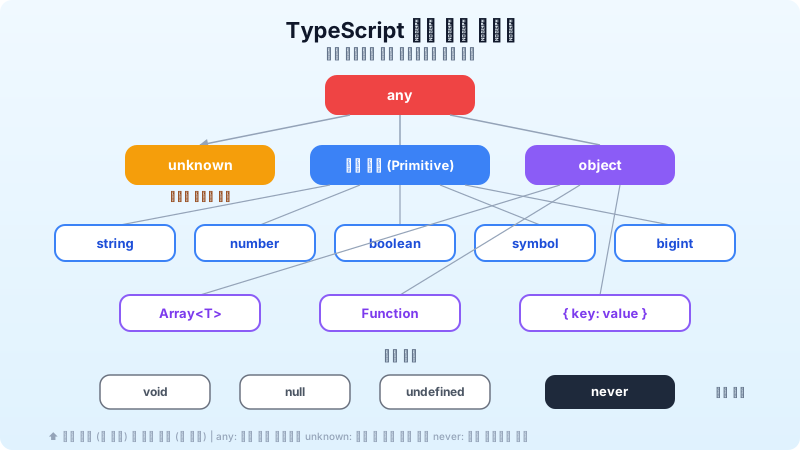
any는 TypeScript의 탈출구이자 함정
`any` 타입은 TypeScript의 모든 타입 검사를 비활성화합니다. `any`를 사용하는 것은 JavaScript를 쓰는 것과 다름없습니다.
```typescript // ❌ Bad: any로 모든 타입 검사를 무력화 function processData(data: any) { return data.name.toUpperCase(); // 런타임 에러 가능 }
// ✅ Good: 구체적 타입 정의 interface User { name: string; email: string; age: number; }
function processData(data: User) { return data.name.toUpperCase(); // 안전 } ```
any 대안 패턴
1. unknown — 안전한 any
`unknown`은 `any`처럼 모든 값을 받을 수 있지만, 사용 전에 타입 검사를 강제합니다.
```typescript function parseJSON(json: string): unknown { return JSON.parse(json); }
const data = parseJSON('{"name": "Kim"}'); // data.name; // ❌ Error: unknown 타입에 .name 접근 불가
if (typeof data === 'object' && data !== null && 'name' in data) { console.log((data as { name: string }).name); // ✅ 안전 } ```
2. 제네릭 — 타입을 매개변수로
```typescript // ❌ any를 반환하면 타입 정보 소실 function firstElement(arr: any[]): any { return arr[0]; }
// ✅ 제네릭으로 입력-출력 타입 연결 function firstElement<T>(arr: T[]): T | undefined { return arr[0]; }
const num = firstElement([1, 2, 3]); // type: number | undefined const str = firstElement(['a', 'b']); // type: string | undefined ```
---
유틸리티 타입 마스터하기
TypeScript에 내장된 유틸리티 타입은 기존 타입을 변환하여 새로운 타입을 만들 때 매우 유용합니다.
Partial<T>와 Required<T>
```typescript interface Config { host: string; port: number; debug: boolean; }
// 모든 필드가 선택적 — 부분 업데이트에 유용 type PartialConfig = Partial<Config>; // { host?: string; port?: number; debug?: boolean }
function updateConfig(config: Config, updates: Partial<Config>): Config { return { ...config, ...updates }; } ```
Pick<T, K>와 Omit<T, K>
```typescript interface User { id: number; name: string; email: string; password: string; createdAt: Date; }
// API 응답에서 비밀번호 제외 type PublicUser = Omit<User, 'password'>;
// 목록 표시에 필요한 필드만 선택 type UserListItem = Pick<User, 'id' | 'name'>; ```
Record<K, V>
```typescript // ❌ 인덱스 시그니처 — 키가 뭐든 허용 const scores: { [key: string]: number } = {};
// ✅ Record로 키를 제한 type Subject = 'math' | 'english' | 'science'; const scores: Record<Subject, number> = { math: 90, english: 85, science: 92, }; // scores.history = 80; // ❌ Error: 'history'는 Subject에 없음 ```
ReturnType<T>와 Parameters<T>
```typescript function createUser(name: string, age: number) { return { id: Math.random(), name, age, createdAt: new Date() }; }
// 함수의 반환 타입을 자동 추출 type User = ReturnType<typeof createUser>; // { id: number; name: string; age: number; createdAt: Date } ```
---
타입 좁히기(Type Narrowing) 패턴
typeof 가드
```typescript function formatValue(value: string | number): string { if (typeof value === 'string') { return value.toUpperCase(); // value는 string으로 좁혀짐 } return value.toFixed(2); // value는 number로 좁혀짐 } ```
판별 유니온(Discriminated Union)
가장 강력하고 실용적인 타입 좁히기 패턴입니다:
```typescript // 공통 필드(type)로 유니온 멤버를 구별 type ApiResponse = | { type: 'success'; data: User[]; total: number } | { type: 'error'; message: string; code: number } | { type: 'loading' };
function handleResponse(response: ApiResponse) { switch (response.type) { case 'success': // response.data, response.total 접근 가능 console.log(`${response.total}명의 사용자`); break; case 'error': // response.message, response.code 접근 가능 console.error(`에러 ${response.code}: ${response.message}`); break; case 'loading': // 추가 필드 없음 console.log('로딩 중...'); break; } } ```
커스텀 타입 가드
```typescript interface Fish { swim: () => void } interface Bird { fly: () => void }
// is 키워드로 커스텀 타입 가드 정의 function isFish(pet: Fish | Bird): pet is Fish { return (pet as Fish).swim !== undefined; }
function move(pet: Fish | Bird) { if (isFish(pet)) { pet.swim(); // pet은 Fish로 좁혀짐 } else { pet.fly(); // pet은 Bird로 좁혀짐 } } ```
---
제네릭 실전 패턴
제약 조건(Constraints)이 있는 제네릭
```typescript // T는 반드시 { id: number }를 포함해야 함 function findById<T extends { id: number }>(items: T[], id: number): T | undefined { return items.find(item => item.id === id); }
// ✅ id 필드가 있으므로 OK findById([{ id: 1, name: 'Kim' }], 1);
// ❌ Error: { title: string }에는 id가 없음 // findById([{ title: 'Hello' }], 1); ```
keyof와 제네릭 결합
```typescript function getProperty<T, K extends keyof T>(obj: T, key: K): T[K] { return obj[key]; }
const user = { name: 'Kim', age: 30, email: '[email protected]' }; const name = getProperty(user, 'name'); // type: string const age = getProperty(user, 'age'); // type: number // getProperty(user, 'phone'); // ❌ Error: 'phone'은 keyof User에 없음 ```
조건부 타입(Conditional Types)
```typescript // T가 배열이면 요소 타입을, 아니면 T 자체를 반환 type UnpackArray<T> = T extends (infer U)[] ? U : T;
type A = UnpackArray<string[]>; // string type B = UnpackArray<number>; // number ```
---
실전 팁 모음
1. as const로 리터럴 타입 유지
```typescript // 일반 배열: string[]으로 추론 const colors = ['red', 'green', 'blue'];
// as const: readonly ['red', 'green', 'blue']로 추론 const colors = ['red', 'green', 'blue'] as const; type Color = typeof colors[number]; // 'red' | 'green' | 'blue' ```
2. 열거형(Enum) 대신 유니온 타입
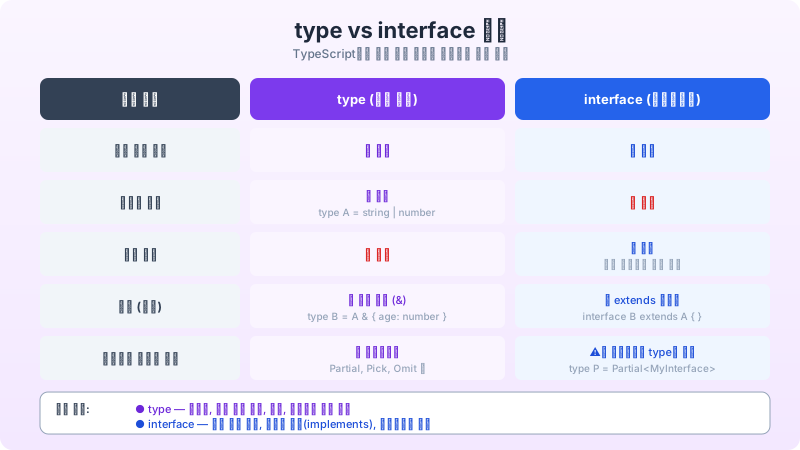
```typescript // ❌ Enum: 런타임 객체가 생성되어 번들 크기 증가 enum Status { Active, Inactive, Pending }
// ✅ 유니온 타입: 컴파일 후 제거, 번들 크기 영향 없음 type Status = 'active' | 'inactive' | 'pending'; ```
3. satisfies 연산자 (TypeScript 4.9+)
```typescript type Route = { path: string; component: string };
// satisfies: 타입 검사 + 추론된 타입 유지 const routes = { home: { path: '/', component: 'HomePage' }, about: { path: '/about', component: 'AboutPage' }, } satisfies Record<string, Route>;
// routes.home.path의 타입이 string이 아닌 '/'로 유지됨 ```
4. 타입 안전한 이벤트 에미터
```typescript type EventMap = { login: { userId: string; timestamp: Date }; logout: { userId: string }; error: { message: string; code: number }; };
class TypedEmitter<T extends Record<string, unknown>> { on<K extends keyof T>(event: K, handler: (payload: T[K]) => void): void { // 구현 }
emit<K extends keyof T>(event: K, payload: T[K]): void { // 구현 } }
const emitter = new TypedEmitter<EventMap>(); emitter.on('login', (payload) => { // payload는 { userId: string; timestamp: Date }로 자동 추론 console.log(payload.userId); }); ```
---
tsconfig.json 엄격 설정 권장
```json { "compilerOptions": { "strict": true, "noUncheckedIndexedAccess": true, "noImplicitReturns": true, "noFallthroughCasesInSwitch": true, "exactOptionalPropertyTypes": true, "noPropertyAccessFromIndexSignature": true } } ```
- strict: strictNullChecks, strictFunctionTypes 등 7개 옵션 일괄 활성화
- noUncheckedIndexedAccess: 배열/객체 인덱스 접근 시 `undefined` 포함 → 안전한 접근 강제
- exactOptionalPropertyTypes: 선택적 속성에 `undefined`를 명시적으로 전달하는 것을 금지
---
마무리 — TypeScript는 투자 대비 수익이 높은 도구
TypeScript 도입의 초기 비용(타입 정의, 학습 곡선)은 프로젝트가 성장하면서 빠르게 회수됩니다. 코드 리뷰 시간 단축, 런타임 에러 감소, 리팩토링 자신감 향상은 팀 생산성에 직접적으로 기여합니다.
"TypeScript의 목표는 프로그래머를 느리게 하는 것이 아니라, 프로그래머의 자신감을 높이는 것이다." — Anders Hejlsberg (TypeScript 창시자)